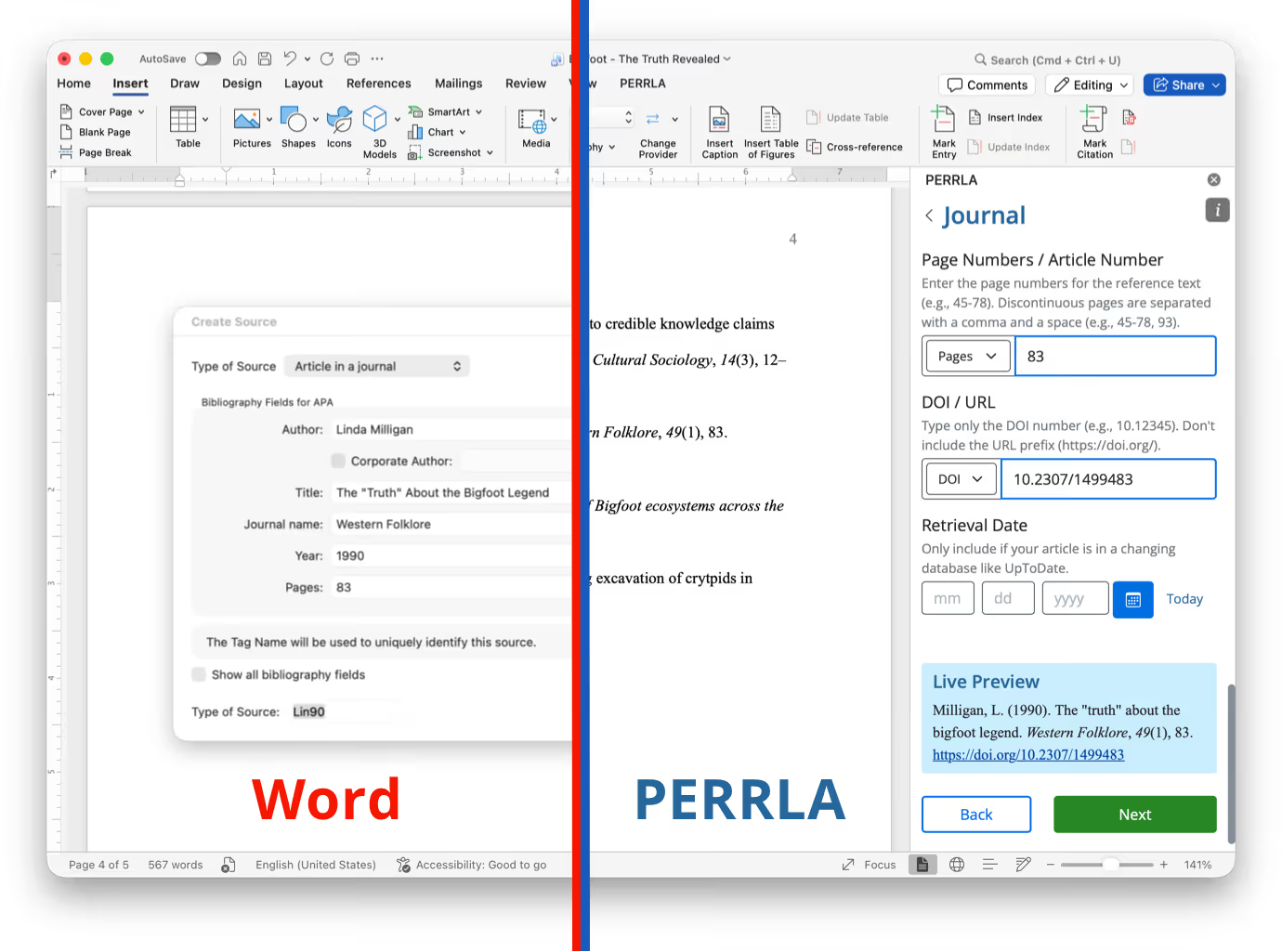
PERRLA vs Word's built-in Reference Tool: Which one formats APA references best?

If you've ever spent 20 minutes fixing a reference list that still looked wrong, you already know the problem. APA formatting is detail-heavy, unforgiving, and weirdly easy to get wrong – even when you're trying your best. This article breaks down how PERRLA and Microsoft Word's built-in reference tool each handle APA citations, so you can decide which one is actually worth your time.
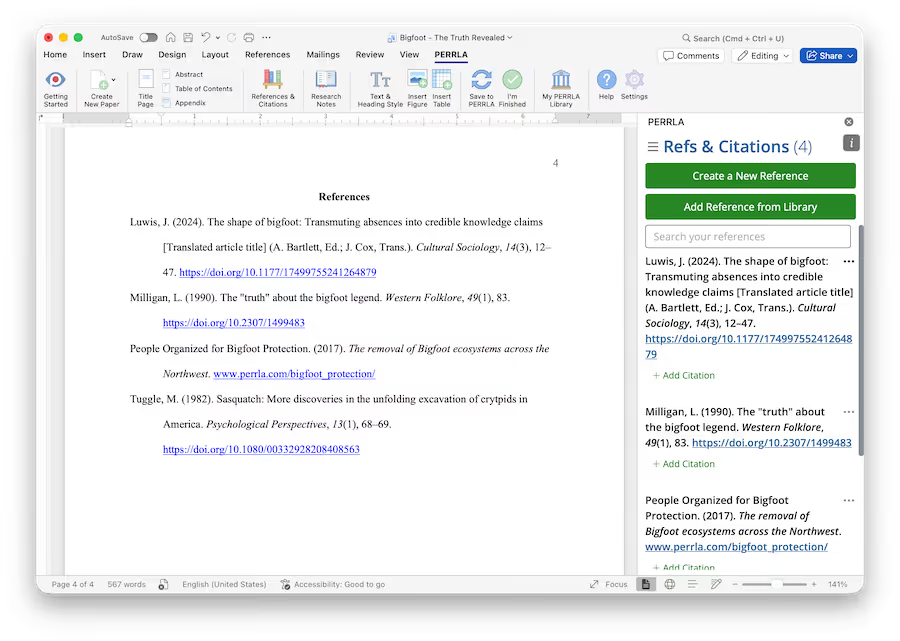
Image of using PERRLA in Microsoft Word

How Does PERRLA Automate APA Reference Formatting?

PERRLA was built to do one thing really well: format academic references correctly, every time. At the center of that is PERRLA's Reference Engine – a proprietary system designed specifically around APA rules (not adapted from something else, not bolted on as an afterthought).

Here's how it works in practice: you search for your source, and PERRLA will create and format it.

PERRLA applies the latest APA 7 guidelines automatically, keeps your in-text citations and reference list in sync, and updates everything as you make edits. You don't have to memorize hanging indents or wonder if you've got the DOI format right.

PERRLA just handles it from start to finish.

What Are PERRLA's Key Features for APA Citation Automation?

A few things that set PERRLA apart from generic tools:

  • Fast, click-to-add references – Add a source in a few clicks. No formatting gymnastics required.
  • An expert-built Reference Engine – This wasn't put together by a general-purpose development team. It was built by people who know APA inside and out, and it's updated to reflect current guidelines.
  • A clean, focused interface – Everything is laid out around the citation workflow, so you're not digging through menus to find what you need.

The result: less time formatting, fewer errors, and a reference list you can actually trust.

What Are the Limitations of Word's Built-in Reference Tool for APA?

Word can do a lot of things. APA formatting isn't really one of them – at least not well.

How Does Word's Reference Tool Handle APA Citations?

Word's reference feature lets you enter source details and will attempt to format them. The operative word there is "attempt." In practice, you're often doing a lot of the work yourself – manually entering fields, double-checking the output, and fixing inconsistencies that sneak in along the way.

Critically, Microsoft Word only supports the APA 6th Edition – NOT the latest APA 7th Edition. The most recent version of the APA was published in 2019. Word's Reference tools are half a decade behind on what APA actually looks like.

Word's tools also have limited coverage for many source types and doesn't follow APA's more nuanced rules. It's a general-purpose tool trying to do a specialist's job, and it shows.

How Do PERRLA and Word Compare in Usability and Accuracy?

PERRLA wins on both counts, and it's not particularly close.

Word's reference tool was designed as one feature inside a massive, multipurpose application. PERRLA was designed to do exactly what you need it to do: manage APA references accurately and without friction. That focus shows up in the workflow, the accuracy of the output, and the time you save not having to fix things afterward.

What are the benefits of using PERRLA over Word's Reference Tools?

Here's the short version:

  • Comprehensive formatting – PERRLA applies current APA conventions across source types, so you're not guessing whether your journal article looks different from your website citation.
  • Real-time updates – Edit a source and your reference list updates automatically. Everything stays in sync.
  • An interface built for citations – No menu diving, no workarounds. The tool does what you came to do.

If your goal is to spend less time on formatting and more time on the actual writing, PERRLA is the clearer choice.

Conclusion

Word is a great word processor. PERRLA is an excellent APA tool. They're not really competing for the same job.

If accurate, consistent APA references matter to you (and if you're submitting academic work, they do) PERRLA gives you a dedicated Reference Engine, automatic updates, and a workflow that doesn't fight you. Give it a try and see how much time you get back.

Pick your perfect plan

Subscribe for as long as you want & save along the way
7-Day Free Trail
$0

✔️ Great for testing how PERRLA works for you

✔️ Access to all PERRLA features & software

✔️ No credit card requried!

Try PERRLA for 7 Days
Monthly
$12.95

✔️ Access to all PERRLA features & software

✔️ Great for exploring PERRLA's functionality

✔️ Our most affordable option

Subscribe Now
1 Year
$79.95

✔️ Save 50% over 12 Months

✔️ Access to all PERRLA features & software

✔️ Excellent choice for full-time students

Subscribe Now

Most Popular

2 Years
$129.95

✔️ Save 35% over 1 Year

✔️ Great value for Masters & Doctoral students

✔️ Access to all PERRLA features & software

Subscribe Now

Questions? Let's chat – real humans here

Image of students gathered around a desk

PERRLA for your institution

Ready for your students to turn in better papers? Check out our Partners page to learn how PERRLA can help your institution's students succeed.
Image of student typing at a laptop

Talk to support

Email us for a fast, clear response. Check out our Help Center for articles, tutorials, and videos on using PERRLA.
Email PERRLA Support